
Modern Warfare 4 on PC: I Played It, Here's How It Runs
 Yasir Rehman
27 August 2026 · 10 min read
Yasir Rehman
27 August 2026 · 10 min read
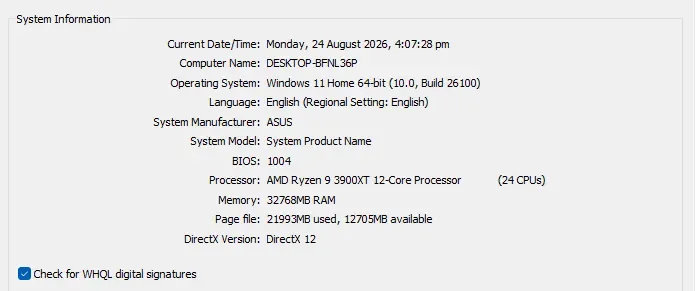
Quick note about who is writing this: I actually played Modern Warfare 4 myself, so everything here is from my own experience, not just copied from a spec sheet. My PC is a Ryzen 9 3900, an RTX 3070 and 32 GB RAM. Good PC, but not a super expensive 2026 monster, so I think it is a good example for most of you reading this. Below I will cover how the game actually runs, what your PC needs, the download size, and the TPM 2.0 and Secure Boot thing that stops a lot of people from playing on launch night.
How Modern Warfare 4 Actually Runs
Short answer: it ran better than I thought. On my 3070 I played on 1080p with all settings on max, and I was getting 100+ FPS easily. That is on full max, I did not lower anything to get there. For a 2026 Call of Duty on a card that is already 2 generations old, this made me happy.
Then I moved to 1440p (2K), still all settings maxed, and I got around 60 to 70 FPS. Still very playable. If I lowered a few settings I could get more frames for sure, but I wanted to see how it runs on full quality, not the minimum it needs. So my honest opinion for anyone with a similar PC: this game is well optimized. It is not one of those launches where your good mid-range card gets destroyed.
So if your PC is close to mine — a 30 series NVIDIA card or the AMD version, a recent 6 or 12 core CPU, 16 GB RAM or more — I think you are totally fine. You will probably max it on 1080p and hold high frames, and 2K is also very doable if you are okay with that 60+ range or you don't mind tuning a setting or two.
MW4 PC System Requirements
Here are the official requirements so you can see where your PC stands. The minimum is enough to launch and play, and the recommended is for a smoother 60 FPS in most situations.
| Component | Minimum | Recommended |
|---|---|---|
| OS | Windows 10 64-bit (latest update) | Windows 11 64-bit (latest update) |
| CPU | AMD Ryzen 5 1600 or Intel Core i5-8400 | AMD Ryzen 5 3600 or Intel Core i7-8700K |
| RAM | 12 GB | 16 GB |
| GPU | Radeon RX 470, GeForce GTX 970 / 1060, or Intel Arc A580 | Radeon RX 6700 XT, GeForce RTX 3060, or Intel Arc B580 |
| Video Memory | 3 GB | 8 GB |
| Storage | SSD with 70 GB free | SSD with 70 GB free |
A few things apply to everyone: you need a broadband internet connection, DirectX 12, and an Intel or AMD CPU with the AVX instruction set. If you use an Intel Arc GPU, you also need Resizable BAR turned on. And one important point on storage — it must be an SSD. A normal hard drive will not work. Keep more than 70 GB free too, because the game gets bigger as new seasons and updates come out.
Looking at these numbers next to my own result, you can see why I got the FPS I did. My 3070 sits well above the recommended GPU, so 100+ frames on 1080p makes sense. If your card is around the recommended level (RTX 3060, RX 6700 XT), expect a good 60+ experience. If you are down at the minimum, you will still play, you will just need to lower some settings — which I will get to next.
What I Would Change on a Low-End PC
My PC is above the minimum, so I had extra room. If your PC is closer to the bottom — something like a GTX 1060 or RX 470 — you will not be maxing the game, and that is okay. It still runs, you just have to spend your frames more carefully. From how the settings behaved for me, this is the order I would turn things down.
First thing I lower is the settings that eat a lot of frames but you barely notice in a fast shooter: shadow quality, particle effects, and ambient occlusion. When you are moving and shooting all the time, you don't even look at these things, but they are heavy to run. After that, texture quality if your VRAM is low — the minimum spec only has 3 GB VRAM, and textures are the first thing that will choke a card that small.
Next big thing is resolution and upscaling. Going from 2K down to 1080p alone gives you a big jump in frames. And MW4 has upscaling options that let the game run on a lower resolution inside but still look almost like native. On a low-end card I would use these a lot — they are the difference between a stuttery mess and a smooth 60.
The thing I would NOT touch first is anything that changes how clearly you see enemies. In this game frames are more important than pretty graphics. The whole reason you lower settings is to get a smoother, faster game — not a nicer looking one that you can't aim in.
The Fancy Graphics, If You Want Them
MW4 does have the high-end graphics stuff for people who want it. Infinity Ward put in DLSS 4.5 with frame generation, plus other upscaling options, and ray tracing that works across Campaign, Multiplayer and DMZ — reflections, shadows, ambient occlusion, all of it.
My honest take after playing: ray tracing looks really nice in the campaign, where you have time to stop and look around. But in multiplayer I turned it off. Competitive play is about frames and seeing enemies clearly, and MW4 even comes with ready-made competitive settings made exactly for that — high FPS, low input lag. If you are on an NVIDIA card, DLSS 4.5 and Reflex are the two features I actually care about, because they give you more frames and less delay between your mouse and the screen. That helps you in a gunfight way more than a nice looking shadow does.
So think about the graphics like two different modes. Turn ray tracing on when you want the campaign to look amazing. Turn it off, load the competitive preset and let DLSS do the work when you are trying to win.
Which Platforms Can You Play On?
Modern Warfare 4 is a current-gen game. It runs on PC (through Battle.net, Steam and Xbox on PC), PlayStation 5, and Xbox Series X and Series S. It does NOT run on PS4 or Xbox One — this is the first Modern Warfare to leave the old consoles behind. That is also why the PC requirements are a bit higher than older Call of Duty games; they are not holding back for old hardware anymore.
TPM 2.0 and Secure Boot: Don't Skip This Part
This is the one that catches so many people on launch night, so please read it before you download. MW4 needs TPM 2.0 and Secure Boot turned on to play online. They work together with the anti-cheat to check your PC is safe. If either one is off, the game will not let you into a match — does not matter how strong your PC is.
Good news: if you are on Windows 11, both are almost always already on, because Windows 11 needs them to install in the first place. So most Windows 11 players don't have to do anything. It is mostly Windows 10 PCs, or PCs that someone set up manually, that need a look.
First, Check If They Are Already On
Always check before you change anything. There is a good chance you don't need to do anything at all.
| What to check | How to check it |
|---|---|
| TPM 2.0 | Press Windows key + R, type tpm.msc and press Enter. If it says the TPM is ready to use and the Specification Version says 2.0, you are good. If it says a compatible TPM cannot be found, it is off in the BIOS or not there. |
| Secure Boot | Press the Windows key, type System Information and open it. Look at the Secure Boot State line. "On" means you are done. "Off" means you need to turn it on. |
If both are fine, you can skip the next part — you are ready to play.
How to Turn Them On
Both settings are inside your PC's BIOS (also called UEFI), not inside Windows. The menu names are a bit different on every motherboard brand, so treat this as the general way rather than the exact words on your screen.
| Step | What to do |
|---|---|
| 1 | Open the BIOS. Easiest way from Windows 11: Start → Settings → System → Recovery, then click Restart now next to Advanced startup. Then choose Troubleshoot → Advanced options → UEFI Firmware Settings → Restart. (Or just press the BIOS key — often Del, F2, F10 or Esc — again and again while the PC is starting up.) |
| 2 | Find the TPM setting, usually under Security or Advanced. On AMD PCs it is often called AMD fTPM. On Intel PCs it is often called Intel PTT. Set it to Enabled. |
| 3 | Find Secure Boot, usually under Boot or Security. Set it to Enabled. If you see a boot mode option, make sure it is on UEFI mode, not Legacy or CSM. |
| 4 | Save and exit — usually the F10 key. Your PC will restart. |
| 5 | Back in Windows, do the two checks above again to make sure both now say enabled. |
Please be careful here. Changing BIOS settings the wrong way can cause real problems, even a PC that won't start up. Secure Boot especially needs your Windows drive to be set up as GPT and your BIOS in UEFI mode — on most Windows 11 PCs this is already the case, but on older PCs turning it on the wrong way can stop Windows from loading. If you are not comfortable inside the BIOS, or the steps don't match what you see on your screen, check your motherboard or PC brand's own guide before changing anything. This is your PC's firmware, so go slow and don't rush it.
So, Is Your PC Ready?
If your PC is around my level or better, don't worry — you will have a great time and probably max it on 1080p. If you are closer to the minimum, the game still runs, you just play on 1080p with the heavy settings turned down, and that is a totally fine way to enjoy it.
And whatever your PC is, sort out TPM 2.0 and Secure Boot first. That one stops more people from playing than a weak graphics card ever does.
Frequently Asked Questions
What FPS did you get in MW4?
On my RTX 3070, 100+ FPS on 1080p with everything maxed, and 60 to 70 FPS on 2K, also maxed. Your numbers will be different with different hardware, but this is a real result from a mid-range card.
Is an RTX 3070 enough for Modern Warfare 4?
More than enough on 1080p — I maxed it and stayed over 100 FPS. On 2K it is still very playable at 60 to 70. The game is well optimized and a 3070 handles it easily.
How much space does MW4 need?
70 GB of SSD space at launch. Keep some extra free on top, because updates make it bigger over time. A normal hard drive will not work — it has to be an SSD.
Can I run MW4 on a low-end PC?
Yes, if you meet the minimum spec. You won't max it, but turning down shadows, particles, ambient occlusion and using upscaling gives you a smooth experience on 1080p.
Do I really need TPM 2.0 and Secure Boot?
Yes, for online play. Without both turned on, the game blocks you from matches no matter how good your PC is. If you are on Windows 11 they are probably already on — just check with the steps above.
Should I turn on ray tracing?
For the campaign, yes, if your card can handle it — it looks great. For competitive multiplayer, I turn it off and go for more frames instead. The competitive preset is made for that.
Does MW4 support DLSS?
Yes, DLSS 4.5 with frame generation on NVIDIA cards. Together with Reflex, it is the feature I care about most for more frames and less input lag.